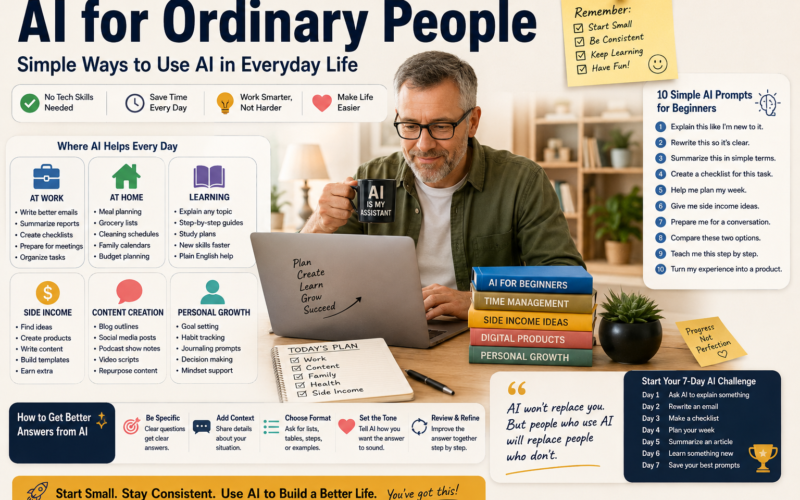
Promise Box

By the end of this guide, you will understand:

  • What AI for ordinary people really means
  • How regular people can use AI without a tech background
  • Simple ways to use AI at work, home, and in daily life
  • Beginner prompts you can copy and use today
  • How AI can help with side income, learning, planning, and confidence

No coding.

No tech talk.

No “machine learning neural network optimization” nonsense, because apparently humans needed to make computers confusing after making them helpful.


Table of Contents

  1. What Does AI for Ordinary People Mean?
  2. Why AI Feels Hard at First
  3. How Ordinary People Can Use AI Every Day
  4. AI for Work
  5. AI for Home and Family Life
  6. AI for Learning New Skills
  7. AI for Side Income
  8. 10 Simple AI Prompts for Beginners
  9. Common Mistakes Beginners Make With AI
  10. How to Start Using AI in 10 Minutes a Day
  11. Final Thoughts

What Does AI for Ordinary People Mean?

AI for ordinary people means using artificial intelligence in a simple, practical way.

It is not about becoming a programmer.

It is not about building robots.

It is not about understanding every technical detail behind ChatGPT, Claude, Gemini, or any other AI tool with a name that sounds like it came from a science fiction committee.

It means using AI to help with normal life.

Things like:

  • Writing a clearer email
  • Making a weekly plan
  • Summarizing a long article
  • Creating a grocery list
  • Learning a new skill
  • Preparing for a job interview
  • Brainstorming side income ideas
  • Turning messy notes into a checklist
  • Explaining confusing topics in plain English

That is the real power of AI.

Not replacing people.

Not making life colder.

Just helping regular people think, write, plan, and learn faster.


Why AI Feels Hard at First

AI feels hard because most people explain it badly.

That is the honest answer.

A regular person asks, “How can this help me?”

Then a tech person replies with something like:

“It uses large language models trained on massive datasets to predict token sequences.”

Fantastic. Very helpful. Let’s all clap for the vocabulary parade.

The truth is simpler.

AI works best when you give it a clear task.

You tell it:

  • What you need
  • Who the answer is for
  • What style you want
  • What format you want
  • Any details it should know

That is it.

You do not need to know how the engine works to drive the car.

You just need to know where you want to go.


How Ordinary People Can Use AI Every Day

AI becomes useful when you stop treating it like a mystery machine and start treating it like a helper.

Here are simple everyday uses.

1. Use AI to Write Better Emails

You can paste a rough email into ChatGPT and ask:

Rewrite this email so it sounds clear, friendly, and professional.

This helps when you know what you want to say, but the words come out stiff, too long, or slightly like you were raised by office memos.

2. Use AI to Summarize Information

AI can take a long article, report, or transcript and turn it into a short summary.

You can ask:

Summarize this in plain English. Give me the main points in bullet points.

This is helpful when you do not have time to read 3,000 words just to find the two sentences that matter.

3. Use AI to Plan Your Week

AI can help you organize your tasks.

You can say:

Help me make a weekly plan based on these tasks.

Then list your tasks.

AI can group them by priority, time, or energy level.

Very rude of it to be organized, but useful.

4. Use AI to Learn Something New

You can ask AI to explain any topic like you are brand new.

For example:

Explain artificial intelligence like I am new to it. Use simple words and real examples.

This works for:

  • AI
  • Budgeting
  • Podcasting
  • Marketing
  • Inventory control
  • Fitness
  • Cooking
  • Job skills
  • Software tools

5. Use AI to Make Checklists

Checklists are one of the easiest ways to use AI.

Ask:

Create a checklist for this task.

Then explain the task.

AI can help you make checklists for:

  • Packing
  • Cleaning
  • Work projects
  • Podcast episodes
  • YouTube videos
  • Grocery shopping
  • Client onboarding
  • Home repairs

Checklists are boring until they save you from forgetting something important. Then suddenly they are civilization itself.


AI for Work

AI can help ordinary people become better at work.

Not by pretending to be someone else.

Not by cheating.

By helping you communicate, organize, and think more clearly.

Ways to Use AI at Work

You can use AI to:

  • Rewrite emails
  • Create meeting notes
  • Summarize reports
  • Build checklists
  • Organize project steps
  • Compare options
  • Prepare talking points
  • Turn messy notes into clean instructions
  • Create training guides
  • Explain software steps

Example Prompt for Work

I need to write a professional email about a delayed shipment. Make it clear, calm, and direct. Keep it short.

Another Work Prompt

Turn these notes into a clear checklist my team can follow.

AI is especially useful for people who already know their job but need help putting their knowledge into words.

That is a big deal.

A lot of experienced people have valuable knowledge trapped in their heads. AI can help turn that knowledge into documents, guides, emails, training notes, and systems.


AI for Home and Family Life

AI is not just for work.

You can use it at home too.

Not in a creepy “smart fridge judging your cheese choices” way.

In a normal useful way.

Simple Home Uses

AI can help you:

  • Plan meals
  • Create grocery lists
  • Build cleaning schedules
  • Plan family activities
  • Organize bills
  • Compare products
  • Explain school topics
  • Plan vacations
  • Create chore charts
  • Prepare for difficult conversations

Example Prompt for Meal Planning

Create a simple 5-day dinner plan for a busy family. Use affordable ingredients and include a grocery list.

Example Prompt for Family Planning

Help me create a weekend plan that includes errands, family time, rest, and one fun activity.

Example Prompt for Hard Conversations

Help me prepare for a calm conversation about a stressful topic. Give me talking points and what not to say.

AI can help you slow down and think before you react.

That alone is worth something.

Most human conflict could be improved by a 30-second pause and fewer dramatic conclusions. Humanity may survive yet.


AI for Learning New Skills

One of the best uses of AI for ordinary people is learning.

AI can act like a patient tutor.

You can ask the same question five different ways and it will not roll its eyes.

Probably.

What You Can Learn With AI

You can use AI to learn:

  • How to use ChatGPT
  • How to start a podcast
  • How to create YouTube videos
  • How to write better emails
  • How to improve your resume
  • How to understand money basics
  • How to use a new app
  • How to create digital products
  • How to market a small business
  • How to organize your work

Beginner Learning Prompt

Teach me this topic step by step. Start with the basics. Do not use technical words unless you explain them.

Prompt for Faster Understanding

Explain this using a simple example from everyday life.

This helps because AI can adjust to your level.

You are not stuck with one textbook, one teacher, or one confusing YouTube video from a guy who starts every sentence with “what’s up guys.”


AI for Side Income

AI can also help ordinary people explore side income ideas.

That does not mean AI magically prints money.

It does not.

Anyone telling you that is probably selling a course from a rented kitchen island.

But AI can help you move faster.

Ways AI Can Help With Side Income

AI can help you:

  • Brainstorm product ideas
  • Write product descriptions
  • Create blog outlines
  • Make Pinterest pin titles
  • Draft emails
  • Build simple checklists
  • Create lead magnets
  • Repurpose podcast content
  • Write sales page copy
  • Turn your experience into a small digital product

Example Side Income Prompt

Give me 10 side income ideas based on my skills, experience, and available time. Make them realistic for a beginner.

Example Digital Product Prompt

Help me turn my work experience into a simple PDF guide that solves one specific problem.

Example Pinterest Prompt

Give me 20 Pinterest pin title ideas for a beginner-friendly AI guide.

AI helps you get ideas out of your head and onto the page.

That is where progress starts.

Not in overthinking.

Not in buying another tool.

Not in watching 17 videos and calling it “research,” which is just procrastination wearing a tiny business hat.


10 Simple AI Prompts for Beginners

Here are 10 prompts you can use today.

1. Explain This Simply

Explain this like I am new to it. Use simple words and give me an example.

2. Rewrite This Clearly

Rewrite this so it sounds clear, friendly, and professional.

3. Make a Weekly Plan

Help me make a weekly plan based on these tasks.

4. Give Me Side Income Ideas

Give me 10 side income ideas based on my skills and experience.

5. Summarize This

Summarize this in plain English. Give me the key points in bullet points.

6. Help Me Prepare for a Hard Conversation

Help me prepare for a calm and honest conversation about this situation.

7. Create a Checklist

Create a checklist for this task.

8. Compare These Options

Compare these two options and give me the pros and cons of each.

9. Teach Me Step by Step

Teach me this topic step by step. Start with the basics.

10. Turn My Experience Into a Product

Help me turn my experience into a simple digital product idea.

These prompts are simple on purpose.

Simple works.

Most people do not need advanced prompt engineering.

They need to ask better questions.


Common Mistakes Beginners Make With AI

AI is useful, but beginners often make a few common mistakes.

Mistake 1:Asking Vague Questions

Bad prompt:

Help me with AI.

Better prompt:

Give me 5 simple ways I can use AI to save time at work this week.

Specific questions get better answers.

Stunning development, I know.

Mistake 2:Not Giving Context

AI needs details.

Instead of:

Write an email.

Try:

Write a short email to my manager explaining that the report will be done tomorrow morning. Keep it professional and calm.

Mistake 3:Accepting the First Answer

The first answer is not always the best answer.

Ask AI to improve it.

Try:

Make this shorter.

Or:

Make this sound more natural.

Or:

Give me a simpler version.

Mistake 4:Not Checking Important Information

AI can make mistakes.

Use it as a helper, not a final authority.

For important topics like health, legal issues, money, or safety, verify the information with a qualified source.

Yes, the machine needs supervision.

Like a toddler with a calculator.

Mistake 5:Trying Too Many Tools at Once

Start with one tool.

Use ChatGPT, Claude, or Gemini.

Learn one well before jumping to five others.

The goal is not to collect AI tools like baseball cards.

The goal is to solve real problems.


How to Start Using AI in 10 Minutes a Day

You do not need hours.

Start small.

Day 1:Ask AI to Explain Something

Prompt:

Explain artificial intelligence in simple words.

Day 2:Rewrite an Email

Prompt:

Rewrite this email so it sounds clear and professional.

Day 3:Make a Checklist

Prompt:

Create a checklist for cleaning up my workspace.

Day 4:Plan Your Week

Prompt:

Help me plan my week based on these tasks.

Day 5:Summarize Something

Prompt:

Summarize this article in plain English.

Day 6:Learn a Skill

Prompt:

Teach me the basics of using ChatGPT.

Day 7:Save Your Best Prompts

Create a note called:

My AI Prompts

Save the prompts that worked best.

This becomes your personal AI playbook.

Small steps matter.

You do not need to master AI in one weekend. You just need to keep using it.


Why AI for Ordinary People Matters

AI matters because work is changing.

Search is changing.

Content is changing.

Business is changing.

Learning is changing.

That does not mean you need to panic.

It means you need to get familiar with the tools.

The people who benefit most from AI will not always be the most technical people.

They will be the people who know how to ask useful questions.

They will be the people who use AI to:

  • Save time
  • Think better
  • Learn faster
  • Communicate clearly
  • Create more
  • Stay useful
  • Build confidence

That is why AI for ordinary people matters.

It gives regular people access to help that used to require money, time, or special training.


Soft CTA:Start With a Simple AI Checklist

If you are new to AI, do not start with everything.

Start with 10 useful prompts.

A simple checklist can help you practice without feeling lost.

Use prompts for:

  • Work
  • Planning
  • Learning
  • Emails
  • Side income
  • Daily tasks
  • Better decisions

The goal is not to become a tech expert.

The goal is to make your life a little easier.

Tiny improvement. Repeated often. That is how this stuff starts working.


Final Thoughts

AI for ordinary people is not about hype.

It is not about replacing human experience.

It is not about pretending a chatbot knows your life better than you do.

It is about using a practical tool to save time, reduce stress, and get clearer answers.

You can use AI to write better emails.

You can use AI to plan your week.

You can use AI to learn new skills.

You can use AI to explore side income.

You can use AI to organize your thoughts.

And you can start today with one simple prompt:

Explain this like I am new to it.

That is enough to begin.

AI does not have to be confusing.

It can be ordinary.

And ordinary is exactly where most useful things begin.

You have not enough Humanizer words left. Upgrade your Surfer plan.

WRITE ONE LARGE POST TO COPY AND PASTThought for a couple of seconds

AI for Ordinary People:Simple Ways to Use AI in Everyday Life

AI can feel confusing at first.

You hear people talk about artificial intelligence like it belongs only to coders, tech workers, business executives, and people who enjoy saying words like “automation pipeline” at dinner.

But AI is not just for tech experts.

AI is for ordinary people.

It is for busy parents.

It is for workers trying to save time.

It is for small business owners.

It is for people over 50 who do not want to feel left behind.

It is for creators, podcasters, teachers, warehouse workers, office workers, retirees, students, and anyone who has ever looked at a blank screen and thought, “I know what I want to say, but I do not know how to say it.”

That is where AI can help.

Not in some wild, futuristic, robot-takes-over-the-world way.

In a normal, practical, everyday way.

AI can help you write better emails.

It can help you plan your week.

It can explain confusing topics.

It can turn messy notes into a checklist.

It can help you brainstorm ideas.

It can help you learn new skills.

It can even help you explore ways to make extra income.

This is what AI for ordinary people really means.

It means using simple AI tools to make everyday life easier.

Not perfect.

Not magical.

Just useful.

And useful is enough.


What Does “AI for Ordinary People” Mean?

AI for ordinary people means artificial intelligence that regular people can use without needing a technical background.

You do not need to know how to code.

You do not need to understand machine learning.

You do not need to know how a large language model works.

You do not need to pretend you understand every new AI tool that pops up online every 11 minutes, because apparently the internet has decided we needed more subscriptions and more confusion.

You only need to understand this:

AI is a tool that can help you think, write, plan, organize, and learn faster.

That is it.

For most people, AI is useful when it helps with normal life.

Things like:

  • Writing an email
  • Planning a meal
  • Creating a schedule
  • Summarizing information
  • Learning a topic
  • Making a checklist
  • Brainstorming ideas
  • Preparing for a conversation
  • Creating social media posts
  • Organizing work tasks
  • Building a simple digital product

AI is not just about robots.

It is not just about self-driving cars.

It is not just about big companies.

It is about you sitting at your kitchen table with a laptop, coffee, and a problem you want to solve.

That is ordinary AI.

And that is where it gets powerful.


Why AI Feels So Confusing at First

AI feels confusing because most people explain it badly.

A regular person asks:

“What can AI do for me?”

Then someone replies:

“It uses neural networks and predictive modeling to generate statistically likely language outputs based on training data.”

Wonderful.

Very human.

Very helpful.

Let us all stare at the wall now.

The truth is much simpler.

AI works best when you give it a clear task.

You tell it what you want.

You give it context.

You tell it the style you need.

You tell it the format you want.

Then you ask it to help.

That is the basic idea.

For example, instead of asking:

“Help me with work.”

Ask:

“Rewrite this email so it sounds clear, calm, and professional. Keep it short.”

That is a much better prompt.

AI is not hard because you are not smart enough.

AI feels hard because the instructions are often buried under tech language, hype, and people trying to sound smarter than they are.

The good news is this:

You can use AI with simple language.

You can talk to it like a helpful assistant.

You can ask it questions in plain English.

You can make mistakes and try again.

That is how you learn.


Why Ordinary People Should Learn AI Now

AI is already changing how people work, learn, create, and communicate.

That does not mean you need to panic.

Panic is rarely a productive business strategy, even though plenty of people seem committed to testing it.

But it does mean you should start learning.

The people who learn AI early will have an advantage.

Not because AI will do everything for them.

It will not.

But AI can help people move faster.

It can help people write clearer.

It can help people learn faster.

It can help people save time.

It can help people turn their experience into something useful.

For ordinary people, this matters.

Because most people are already busy.

They have jobs.

They have families.

They have bills.

They have responsibilities.

They do not have hours to waste figuring out every new tool.

They need practical help.

AI can give them that.

When used the right way, AI can help regular people:

  • Save time
  • Reduce stress
  • Make better decisions
  • Communicate better
  • Learn new skills
  • Stay relevant at work
  • Create extra income opportunities
  • Build confidence with technology

That is why AI for ordinary people matters.

It gives everyday people access to help that used to be expensive, hard to find, or out of reach.


AI Is Not Just for Young People

A lot of people over 40 or 50 look at AI and think:

“This is not for me.”

That is not true.

AI may actually be more useful for people with life experience.

Why?

Because AI works better when you bring real knowledge to it.

A person with work experience can ask better questions.

A parent can use AI to plan family life.

A tradesperson can use AI to explain their services.

A warehouse worker can use AI to build checklists.

A podcaster can use AI to turn an interview into show notes.

A small business owner can use AI to create emails, social posts, and customer replies.

A person with decades of experience can use AI to turn that knowledge into guides, courses, templates, or digital products.

That is powerful.

You are not starting from zero.

You are bringing your experience.

AI helps you organize it, explain it, and use it.

That is a major difference.

A 22-year-old may know the newest app.

But someone with 25 years of work experience knows real problems.

AI can help turn that experience into value.

So no, AI is not just for young people.

It is for anyone willing to learn one simple step at a time.


How Ordinary People Can Use AI at Work

One of the easiest places to use AI is at work.

You do not need to use it for anything complicated.

Start with communication.

Most jobs involve some form of writing.

Emails.

Reports.

Notes.

Instructions.

Updates.

Messages.

Checklists.

Training documents.

AI can help clean those up.

Use AI to Write Better Emails

Most people do not struggle because they have nothing to say.

They struggle because they do not know how to say it clearly.

AI can help.

You can write a rough version and ask AI to improve it.

Example prompt:

“Rewrite this email so it sounds clear, professional, and friendly. Keep it short.”

You can use this for:

  • Asking a question
  • Giving an update
  • Explaining a delay
  • Responding to a customer
  • Following up after a meeting
  • Clarifying a problem
  • Requesting help

This saves time.

It also reduces the chance that your email sounds angry, confusing, or like it was written during a hostage situation in Microsoft Outlook.

Use AI to Summarize Work Information

Long emails, reports, and documents can waste a lot of time.

AI can summarize them.

Example prompt:

“Summarize this in plain English. Give me the key points and any action items.”

This is useful for:

  • Meeting notes
  • Long emails
  • Reports
  • Policy documents
  • Instructions
  • Project updates
  • Training materials

AI can help you find what matters faster.

You still need to check the information.

But it gives you a starting point.

Use AI to Create Checklists

Checklists are one of the simplest and most useful AI outputs.

Example prompt:

“Turn these notes into a step-by-step checklist.”

You can use this for:

  • Daily work tasks
  • Safety steps
  • Inventory checks
  • Customer service processes
  • Shipping tasks
  • Podcast workflows
  • Content publishing
  • Project planning

Checklists reduce mistakes.

They also make it easier to train someone else.

That is a big deal.

A lot of workplace knowledge lives inside people’s heads.

AI can help turn that knowledge into clear instructions.

Use AI to Prepare for Meetings

Meetings can be useful.

They can also become a live group performance of confusion.

AI can help you prepare.

Example prompt:

“Help me prepare talking points for a meeting about this issue. Keep them clear and professional.”

You can ask AI to create:

  • Meeting agendas
  • Talking points
  • Follow-up emails
  • Questions to ask
  • Summary notes
  • Action items

This helps you walk into a meeting with a plan instead of hoping your brain shows up on time.


How Ordinary People Can Use AI at Home

AI is not just for work.

It can also help with home life.

That does not mean you need a smart fridge, a robot vacuum, and a toaster that asks about your feelings.

It means you can use AI to handle normal household problems.

Use AI for Meal Planning

Meal planning is one of the best everyday uses of AI.

Example prompt:

“Create a simple 5-day dinner plan for a busy family. Use affordable ingredients and include a grocery list.”

You can also add details like:

  • Number of people
  • Food allergies
  • Budget
  • Cooking time
  • Ingredients you already have
  • Healthy options
  • Kid-friendly meals

Example prompt:

“I have chicken, rice, eggs, frozen vegetables, and pasta. Give me 5 simple dinner ideas.”

This can save money and reduce stress.

Because nothing says modern life like standing in front of the fridge at 6:15 p.m. pretending inspiration lives behind the ketchup.

Use AI to Organize Family Schedules

AI can help you plan a busy week.

Example prompt:

“Help me create a weekly family schedule with work, school, chores, meals, exercise, and rest time.”

You can ask it to organize:

  • School events
  • Sports
  • Appointments
  • Chores
  • Errands
  • Family time
  • Meal prep
  • Rest time

AI can help you see the week more clearly.

And sometimes seeing the mess is the first step to managing it.

Use AI for Home Projects

AI can help you plan home projects.

Example prompt:

“Create a step-by-step checklist for cleaning and organizing my garage.”

You can use AI for:

  • Decluttering
  • Moving
  • Cleaning routines
  • Budget planning
  • DIY project steps
  • Yard work planning
  • Home maintenance reminders

It can also help you compare options.

Example prompt:

“Compare hiring someone to paint a room versus doing it myself. Give me pros, cons, estimated time, and what supplies I need.”

That is practical.

That is ordinary AI.


How Ordinary People Can Use AI to Learn

AI is one of the best learning tools available.

The best part is that you can ask questions without feeling embarrassed.

You can ask the same question five times.

You can ask for simpler examples.

You can ask it to explain something like you are brand new.

AI will not sigh loudly and make you feel like you interrupted its important work of being smug.

Use AI as a Personal Tutor

Example prompt:

“Teach me this topic step by step. Start with the basics. Use simple words.”

You can use this for:

  • Learning AI
  • Learning software
  • Understanding money
  • Improving writing
  • Learning marketing
  • Studying history
  • Understanding health terms
  • Learning podcasting
  • Learning job skills

Ask AI to Explain Things in Different Ways

Sometimes the first explanation does not click.

Ask for another version.

Example prompts:

“Explain this with a real-life example.”

“Explain this like I am 12 years old.”

“Explain this using a simple story.”

“Give me the short version first, then the details.”

This helps because people learn in different ways.

AI can adjust the explanation until it makes sense.

That is useful.

Use AI to Create a Learning Plan

If you want to learn something new, ask AI to make a plan.

Example prompt:

“Create a 30-day beginner learning plan for using ChatGPT. Each day should take 10 minutes.”

You can use this for:

  • Learning AI
  • Starting a podcast
  • Building a website
  • Improving public speaking
  • Learning bookkeeping
  • Understanding social media
  • Starting a side hustle

AI can break big topics into smaller steps.

That matters because most people quit when the task feels too large.

Small steps are easier to follow.


How Ordinary People Can Use AI for Side Income

AI can help people explore side income ideas.

But let’s be clear.

AI does not magically make money.

It is not a money printer.

If someone online says, “Use AI to make $10,000 this weekend,” there is a strong chance their real business model is selling you hope in a PDF with a fake countdown timer.

Still, AI can help you create real opportunities.

It can help you move faster.

It can help you turn your skills into products or services.

It can help you write, plan, research, and organize.

Use AI to Find Side Income Ideas

Example prompt:

“Give me 10 realistic side income ideas based on my skills, work experience, and available time.”

Then add your details.

For example:

“I have experience in inventory control, podcasting, writing, and using AI tools. I can work evenings and weekends.”

AI can suggest ideas that fit your background.

That is better than chasing random trends.

Use AI to Create a Simple Digital Product

Digital products are a good fit for ordinary people because they can be based on experience.

You do not need to be famous.

You need to solve a specific problem.

Example prompt:

“Help me turn my experience into a simple PDF guide that solves one clear problem for beginners.”

Digital product ideas include:

  • Checklists
  • Beginner guides
  • Templates
  • Prompt packs
  • Planning sheets
  • Resource lists
  • Mini workbooks
  • Step-by-step guides

For example:

  • AI Starter Kit for Men Over 50
  • Beginner Podcast Launch Checklist
  • Weekly Planning Template
  • Home Budget Starter Sheet
  • Simple Inventory Control Checklist
  • ChatGPT Prompts for Small Business Owners

These are practical.

People buy practical.

Not everyone wants a 12-module course with bonus videos and a private community where nobody talks.

Sometimes they just want the checklist.

Use AI to Write Product Descriptions

Once you have a product idea, AI can help you explain it.

Example prompt:

“Write a simple product description for a beginner-friendly PDF guide called AI Starter Kit for Men Over 50. Make it clear, practical, and trustworthy.”

AI can help with:

  • Product titles
  • Descriptions
  • Sales pages
  • FAQs
  • Email promotions
  • Pinterest pin titles
  • Blog posts
  • Social media captions

You still need to edit it.

You still need to make it sound like you.

But AI can give you a strong first draft.

Use AI to Repurpose Content

If you already create content, AI can help you reuse it.

One podcast episode can become:

  • A blog post
  • A YouTube description
  • Social media posts
  • An email newsletter
  • A quote graphic
  • A short video script
  • A checklist
  • A lead magnet

Example prompt:

“Turn this podcast transcript into a blog post, 5 social posts, 10 quote ideas, and a short email newsletter.”

This saves time.

It also helps you get more value from the work you already did.

That is smart.

Painfully obvious once said out loud, but still smart.


10 Simple AI Prompts for Ordinary People

Here are 10 beginner-friendly AI prompts you can use today.

1. Explain This Like I Am New

“Explain this like I am new to it. Use simple words and give me one real-life example.”

Use this when you want to understand a topic without technical language.

2. Rewrite This Clearly

“Rewrite this so it sounds clear, friendly, and professional. Keep it simple.”

Use this for emails, messages, and notes.

3. Summarize This in Plain English

“Summarize this in plain English. Give me the main points in bullet points.”

Use this for articles, reports, transcripts, and long emails.

4. Help Me Make a Weekly Plan

“Help me make a weekly plan based on these tasks. Group them by priority and suggest what to do first.”

Use this when your to-do list looks like it was assembled during a small emergency.

5. Create a Checklist

“Create a step-by-step checklist for this task.”

Use this for work, home, projects, and planning.

6. Compare These Two Options

“Compare these two options. Give me the pros, cons, costs, risks, and best choice for a beginner.”

Use this for purchases, tools, plans, and decisions.

7. Help Me Prepare for a Hard Conversation

“Help me prepare for a calm conversation about this situation. Give me talking points and what not to say.”

Use this for work, family, and personal conversations.

8. Teach Me Step by Step

“Teach me this topic step by step. Start with the basics and give me small practice tasks.”

Use this when learning something new.

9. Give Me Side Income Ideas

“Give me realistic side income ideas based on my skills, experience, and available time.”

Use this when exploring extra income.

10. Turn My Experience Into a Product

“Help me turn my experience into a simple digital product idea that solves one specific problem.”

Use this when you want to create a guide, checklist, template, or course.


How to Get Better Answers From AI

The secret to better AI answers is better instructions.

That does not mean complicated prompts.

It means clear prompts.

A good AI prompt usually includes four things:

  1. The task
  2. The context
  3. The audience
  4. The format

Here is an example.

Weak prompt:

“Write about AI.”

Better prompt:

“Write a beginner-friendly blog post about AI for ordinary people. The audience is adults who feel behind with technology. Use simple words, short paragraphs, and practical examples.”

That is much better.

AI needs direction.

If you give it vague instructions, you get vague results.

This is not shocking.

This is also how humans work, sadly.

Tell AI Who the Answer Is For

Example:

“Explain this for someone over 50 who is new to AI.”

This helps AI adjust the tone.

Tell AI the Format You Want

Example:

“Give me the answer as a checklist.”

Or:

“Give me the answer in a table.”

Or:

“Give me a step-by-step plan.”

The format matters.

Tell AI What Tone You Want

Example:

“Make it friendly, simple, and direct.”

Or:

“Make it professional but not stiff.”

Or:

“Make it sound like a normal person wrote it.”

Tone matters because AI can sound robotic if you let it.

And no one needs more robotic writing.

We already have enough corporate emails beginning with “I hope this message finds you well,” which is how language goes to die.


Common Mistakes Beginners Make With AI

AI is helpful, but beginners often run into the same problems.

Mistake 1:Asking Questions That Are Too Broad

If you ask:

“How do I use AI?”

You may get a general answer.

Ask something more specific.

Better prompt:

“Give me 5 simple ways I can use AI this week to save time at work.”

Specific questions get better answers.

Mistake 2:Not Giving Enough Context

AI does not know your situation unless you tell it.

Instead of:

“Write an email.”

Try:

“Write a short email to my coworker asking for an update on the shipment. Keep it polite and direct.”

Context helps.

Mistake 3:Expecting the First Answer to Be Perfect

The first answer is a draft.

You can ask AI to improve it.

Try:

“Make it shorter.”

“Make it warmer.”

“Make it more direct.”

“Use simpler words.”

“Give me 3 better versions.”

This is where AI becomes more useful.

You guide it.

It improves.

You edit.

That is the process.

Mistake 4:Not Checking Facts

AI can make mistakes.

It can sound confident and still be wrong.

Very human of it.

For important topics, check the information.

Be careful with:

  • Medical advice
  • Legal advice
  • Financial advice
  • Safety instructions
  • Current news
  • Product prices
  • Statistics
  • Quotes
  • Technical instructions

Use AI as a helper, not the final authority.

Mistake 5:Trying Too Many AI Tools at Once

Start with one tool.

Use ChatGPT, Claude, Gemini, or another major AI assistant.

Learn the basics.

Then expand.

You do not need 19 AI tools.

You need one tool you actually use.

The goal is not to collect apps.

The goal is to solve problems.


A Simple 7-Day AI Starter Plan

If you are new to AI, start small.

Use AI for 10 minutes a day.

That is enough to build confidence.

Day 1:Ask AI to Explain Something

Prompt:

“Explain AI like I am brand new to it. Use simple words and examples.”

Day 2:Rewrite an Email

Prompt:

“Rewrite this email so it sounds clear, friendly, and professional.”

Day 3:Make a Checklist

Prompt:

“Create a checklist for this task.”

Day 4:Plan Your Week

Prompt:

“Help me plan my week based on these tasks.”

Day 5:Summarize Something

Prompt:

“Summarize this article in plain English.”

Day 6:Learn Something New

Prompt:

“Teach me the basics of this topic step by step.”

Day 7:Save Your Best Prompts

Create a note on your phone or computer called:

“My AI Prompts”

Save the prompts that worked well.

This becomes your personal AI playbook.

Simple.

Useful.

Repeatable.

That is how you get better.


Best AI Tools for Ordinary People

You do not need every AI tool.

Start with simple tools.

ChatGPT

Good for:

  • Writing
  • Brainstorming
  • Planning
  • Learning
  • Summarizing
  • Creating prompts
  • Daily problem solving

Claude

Good for:

  • Long documents
  • Writing
  • Editing
  • Summaries
  • Organizing ideas
  • Creating guides and workflows

Gemini

Good for:

  • Google-related tasks
  • Research help
  • Summaries
  • Workspace support

Perplexity

Good for:

  • Research
  • Finding sources
  • Answering questions with links

Canva

Good for:

  • Simple graphics
  • Social media images
  • Presentations
  • Lead magnets
  • PDFs

Descript

Good for:

  • Podcast editing
  • Video editing
  • Transcripts
  • Repurposing content

Start with one.

Then add tools only when you need them.

Do not turn AI into another cluttered junk drawer.


AI for Ordinary People at Work:Real Examples

Here are simple work examples.

Example 1:Turning Rough Notes Into an Email

Rough note:

“Shipment delayed. Parts not here. Need update from vendor. Customer asking.”

Prompt:

“Turn this into a short professional email asking the vendor for an update.”

AI can turn messy notes into something usable.

Example 2:Creating a Work Checklist

Prompt:

“Create a checklist for receiving inventory into a warehouse system.”

AI can help organize steps.

You can then edit based on your actual process.

Example 3:Explaining a Report

Prompt:

“Explain this report in plain English. Tell me what matters most and what action I should take.”

This helps when reports are filled with numbers, terms, and formatting choices made by someone who clearly gave up on beauty.

Example 4:Preparing for a Review

Prompt:

“Help me summarize my work accomplishments for a performance review. Make it clear and professional.”

You can add your accomplishments and let AI organize them.

This is helpful because many people do good work but struggle to explain their value.

AI can help you make that value visible.


AI for Ordinary People at Home:Real Examples

Example 1:Meal Planning

Prompt:

“Create a simple dinner plan for 5 nights. Use chicken, rice, pasta, eggs, and frozen vegetables. Keep it affordable.”

Example 2:Cleaning Plan

Prompt:

“Create a 30-minute cleaning plan for my kitchen and living room.”

Example 3:Family Schedule

Prompt:

“Help me organize a weekly family schedule with work, school, errands, meals, and downtime.”

Example 4:Budget Help

Prompt:

“Help me create a simple monthly budget. Explain each category in plain English.”

Example 5:Helping With School Topics

Prompt:

“Explain this homework topic in simple words so I can help my child understand it.”

AI can make daily life easier.

Not perfect.

But easier.

And easier counts.


AI for Ordinary People Who Create Content

If you create content, AI can save a lot of time.

This applies to:

  • Bloggers
  • Podcasters
  • YouTubers
  • Newsletter writers
  • Coaches
  • Small business owners
  • Affiliate marketers
  • Course creators

AI can help you create more from one idea.

Turn One Idea Into Many Pieces of Content

Example prompt:

“Turn this blog post idea into a blog outline, 5 social media posts, 10 Pinterest titles, and an email newsletter.”

Turn a Podcast Episode Into Content

Example prompt:

“Turn this podcast transcript into show notes, a blog post, 5 quote posts, and a YouTube description.”

Create Better Headlines

Example prompt:

“Give me 20 headline ideas for a blog post about AI for ordinary people. Make them simple and clickable without sounding fake.”

Create a Content Calendar

Example prompt:

“Create a 30-day content calendar for a website that teaches AI to beginners.”

This is a practical way to use AI.

It helps you publish more consistently.

Consistency matters.

Sadly, the internet rewards people who keep showing up instead of people who just think about showing up with dramatic intensity.


AI for Ordinary People and Small Business Owners

Small business owners can use AI in simple ways.

You do not need a huge system.

You can start with basic tasks.

AI can help small business owners:

  • Write customer replies
  • Create service descriptions
  • Make FAQs
  • Write social media posts
  • Draft blog posts
  • Create email campaigns
  • Build customer intake questions
  • Summarize reviews
  • Create training documents
  • Plan promotions
  • Write product descriptions

Example Prompt for Customer Service

“Write a polite reply to a customer asking about a delayed order. Apologize, explain that we are checking on it, and promise an update by tomorrow.”

Example Prompt for Service Pages

“Write a simple service page for a local business that offers home cleaning. Make it clear, friendly, and focused on busy families.”

Example Prompt for FAQs

“Create 10 frequently asked questions for a beginner-friendly AI consulting service.”

AI can help small businesses look more professional.

It can also save time.

That matters when one person is doing sales, service, marketing, billing, and emotional damage control from printer issues.


AI for Ordinary People and Extra Income

Extra income is one reason many people become interested in AI.

That makes sense.

People want options.

They want more breathing room.

They want to use their skills.

AI can help, but you need a realistic plan.

Here are practical ways ordinary people can use AI for extra income.

1. Create Simple PDF Guides

Choose one problem.

Solve it in a short guide.

Examples:

  • AI Starter Kit for Men Over 50
  • Simple ChatGPT Prompts for Busy Parents
  • Beginner Podcast Checklist
  • Weekly Planning Workbook
  • Small Business Email Templates
  • Job Interview Prep Guide

AI can help write the outline, draft the content, and create the sales copy.

2. Sell Templates

People love templates because they save time.

Examples:

  • Email templates
  • Content calendars
  • Podcast planning sheets
  • Budget trackers
  • AI prompt packs
  • Client onboarding forms
  • Business checklists

AI can help you create and organize them.

3. Offer AI Setup Services

Many people know they should use AI but do not know where to start.

You can help them set up simple systems.

Examples:

  • Custom ChatGPT prompt packs
  • Claude folder systems
  • Content repurposing workflows
  • Podcast show note templates
  • Small business email response systems
  • AI beginner training sessions

This can become a service business.

Start small.

Solve one problem for one type of person.

4. Use AI for Affiliate Content

AI can help you create content around products you already recommend.

Examples:

  • Product comparison posts
  • How-to guides
  • Review outlines
  • Pinterest pin titles
  • Email promotions
  • Buyer guides

The key is trust.

Do not promote random garbage.

Recommend products that actually help people.

Strange concept, I know.

5. Repurpose Existing Knowledge

If you have years of work experience, you can turn it into helpful content.

Examples:

  • A warehouse checklist
  • A beginner’s guide to inventory control
  • A podcast launch guide
  • A guide to using AI at work
  • A simple planning system for busy parents

AI helps you package what you already know.

That is one of the best opportunities for ordinary people.


How to Build Confidence With AI

Confidence comes from using AI.

Not reading about AI forever.

Not watching endless tutorials.

Not saving 49 videos to a playlist called “learn later,” which is where good intentions go to be quietly buried.

Start using AI on small tasks.

Ask it to:

  • Rewrite one email
  • Make one checklist
  • Explain one topic
  • Plan one day
  • Summarize one article
  • Brainstorm one idea

Small wins build confidence.

After a few days, AI starts to feel less strange.

After a few weeks, you start seeing new ways to use it.

After a few months, you may wonder how you worked without it.

That is the shift.

You do not need to become an expert overnight.

You need to start.


Is AI Safe for Ordinary People to Use?

AI is useful, but you should use it wisely.

Do not paste private information into AI tools unless you understand the privacy settings.

Be careful with:

  • Social Security numbers
  • Banking information
  • Passwords
  • Medical records
  • Private company data
  • Customer information
  • Legal documents
  • Confidential work information

Use common sense.

AI is a tool.

It is not a vault.

Also, check important information before acting on it.

AI can be wrong.

It can make things up.

It can misunderstand your request.

It can sound confident while being completely off.

Again, very human of it.

Use AI for help, drafts, ideas, and summaries.

Use your judgment for final decisions.


The Best First Prompt for Beginners

If you are brand new to AI, start with this prompt:

“Explain this like I am new to it. Use simple words. Give me examples. Then give me one small action step.”

This prompt works for almost anything.

Examples:

“Explain budgeting like I am new to it. Use simple words. Give me examples. Then give me one small action step.”

“Explain ChatGPT like I am new to it. Use simple words. Give me examples. Then give me one small action step.”

“Explain podcast SEO like I am new to it. Use simple words. Give me examples. Then give me one small action step.”

This is a strong beginner prompt because it gives AI clear instructions.

It asks for:

  • Simple language
  • Examples
  • Action steps

That is what ordinary people need.

Not theory.

Not hype.

Practical help.


A Simple AI Routine for Everyday Life

Here is a simple routine you can follow.

Morning

Ask AI:

“Help me plan my day based on these tasks.”

List your tasks.

Ask it to group them by:

  • Must do
  • Should do
  • Can wait

Midday

Ask AI:

“Rewrite this message so it sounds clear and professional.”

Use it for emails or work communication.

Evening

Ask AI:

“Summarize what I got done today and help me plan tomorrow.”

This helps you stay organized.

Weekly

Ask AI:

“Review my week and help me plan next week. Focus on work, family, health, and personal goals.”

This creates a simple rhythm.

And unlike most productivity systems, it does not require buying a leather notebook, learning a color-coded method, or pretending your life is a Pinterest board.


AI for Ordinary People:Best Use Cases

Here is a simple list of useful AI tasks.

Work

  • Write emails
  • Summarize reports
  • Create checklists
  • Prepare talking points
  • Organize notes
  • Create training guides
  • Draft meeting agendas
  • Compare options

Home

  • Meal planning
  • Grocery lists
  • Family schedules
  • Cleaning routines
  • Budget planning
  • Vacation ideas
  • Chore charts
  • Home project steps

Learning

  • Explain topics
  • Create study plans
  • Make flashcards
  • Simplify complex ideas
  • Create practice questions
  • Teach step by step

Content Creation

  • Blog outlines
  • Podcast show notes
  • Social media posts
  • YouTube descriptions
  • Email newsletters
  • Pinterest titles
  • Lead magnets

Side Income

  • Product ideas
  • Sales page copy
  • Digital product outlines
  • Fiverr gig descriptions
  • Email templates
  • Affiliate content
  • Course outlines

Personal Growth

  • Goal planning
  • Habit tracking
  • Reflection prompts
  • Hard conversation prep
  • Decision-making support
  • Journaling prompts

AI can support many parts of life.

The trick is to start with one.


Why AI Will Not Replace Your Experience

Some people worry AI will replace human experience.

That fear is understandable.

But AI works best when paired with real experience.

AI does not know your life.

It does not know your judgment.

It does not know your values.

It does not know the full story.

You bring those things.

AI brings speed, structure, and ideas.

That combination is powerful.

For example, if you have 20 years of work experience, AI can help you turn that experience into:

  • Training guides
  • Checklists
  • Blog posts
  • Courses
  • Consulting offers
  • Templates
  • Presentations

AI does not replace your experience.

It helps you express it.

That is the opportunity.


Final Thoughts:AI Can Be Ordinary and Powerful

AI does not have to be confusing.

It does not have to be only for tech people.

It does not have to feel out of reach.

AI for ordinary people means using simple tools to solve real problems.

It means writing better emails.

It means planning your week.

It means learning faster.

It means turning your experience into something useful.

It means saving time.

It means building confidence.

It means getting help when you feel stuck.

You do not need to master every AI tool.

You do not need to understand every technical term.

You do not need to become someone else.

You just need to start with one useful prompt.

Start here:

“Explain this like I am new to it. Use simple words. Give me examples. Then give me one small action step.”

That is enough to begin.

AI is not just for experts.

AI is not just for young people.

AI is not just for big companies.

AI is for ordinary people.

And ordinary people are exactly who need useful tools the most.

Joe Foley
Written by

Joe Foley

Contributing writer at AI for Ordinary People, passionate about making technology accessible to everyone.

Leave a Reply

Your email address will not be published. Required fields are marked *