You've probably heard about ChatGPT 5.2.
Maybe you caught a headline. Maybe someone mentioned it at work. Maybe you're wondering if you should care.
Here's the short answer:you should.
Not because it's flashy or revolutionary. ChatGPT 5.2 isn't about wow moments. It's about fewer headaches when you're trying to get something done.
Let me explain what changed, why it matters, and how ordinary people like you and me can actually use it.
What Is ChatGPT 5.2?
ChatGPT 5.2 is the latest version of OpenAI's AI assistant. It came out on December 11, 2025.
At its core, it's still a tool you talk to using plain English. You ask questions. You describe problems. It responds with text.
What makes 5.2 different isn't that it feels brand new. It feels steadier.
Compared to earlier versions, it's better at staying on track, understanding what you actually mean, and finishing the task you asked for without drifting.
In the timeline of ChatGPT models, 5.2 is less about flashy upgrades and more about refinement. It focuses on doing the basics better.
That matters because most people don't need more features. They need fewer mistakes.
The Context:Where ChatGPT 5.2 Fits
ChatGPT 5.2 builds on GPT-5, which launched in August 2025, and GPT-5.1, which came out in November 2025.
This release happened during intense competition with Google's Gemini 3. Some news outlets reported OpenAI treated this as an urgent priority, though the company hasn't confirmed that publicly.
The result? A model that's smarter, more accurate, and less likely to hallucinate.
GPT-5.2 comes in three versions:
- Instant:Fast and optimized for routine queries like information-seeking, writing, and translation.
- Thinking:Excels at structured, complex work such as coding, math, long-document analysis, and planning.
- Pro:The top-tier version for maximum accuracy on difficult problems.
Most people will use Instant. If you're on a free account, you'll get access as the rollout expands (it started with paid users).
If you're on a paid plan (Plus, Pro, Team, or Enterprise), you can switch between versions depending on what you need.
What Changed in ChatGPT 5.2
Here are the changes that actually affect everyday users.
Clearer Understanding of Instructions
ChatGPT 5.2 is better at picking up on intent.
If you ask for something specific, it's less likely to:
- Ignore part of the request
- Answer a different question
- Jump ahead without context
This reduces the back-and-forth that frustrates people.
More Natural Writing and Tone
The writing feels less stiff.
Emails, outlines, and explanations sound closer to how a real person would say them. You still need to guide tone, but the default is more natural than before.
That means fewer rewrites just to make things sound human.
Better Follow-Through on Multi-Step Tasks
Earlier versions often handled step one well and then lost focus.
ChatGPT 5.2 does a better job of:
- Remembering earlier instructions
- Completing tasks in the right order
- Keeping consistent logic across longer answers
This matters for planning, organizing, and thinking through problems.
Fewer Frustrating Mistakes
You'll still see errors. This is not perfect.
What changed is frequency.
You're less likely to see obvious contradictions or sudden topic shifts that break trust.
OpenAI reports that hallucinations are down by 30 to 40 percent depending on the task. The exact numbers come from their internal testing, but multiple independent sources confirm the model is noticeably more reliable.
More Consistent Answers
If you ask the same question in slightly different ways, the answers tend to line up better.
This makes the tool feel more reliable for daily use.
Better Long-Context Understanding
ChatGPT 5.2 can handle up to 400,000 tokens. That's hundreds of documents at once.
For most people, this means you can upload multiple files or paste long conversations without losing the thread.
Improved Coding, Vision, and Tool Use
If you code, ChatGPT 5.2 is better at debugging and writing clean code.
If you work with images, it's better at understanding what's in them.
If you use it with other tools (like spreadsheets or databases), it's better at connecting the dots.
Why This Matters for Ordinary People

For most people, AI is not about speed or power. It's about mental relief.
ChatGPT 5.2 helps by:
- Cutting down on repeated rewrites
- Reducing decision fatigue
- Helping people think things through clearly
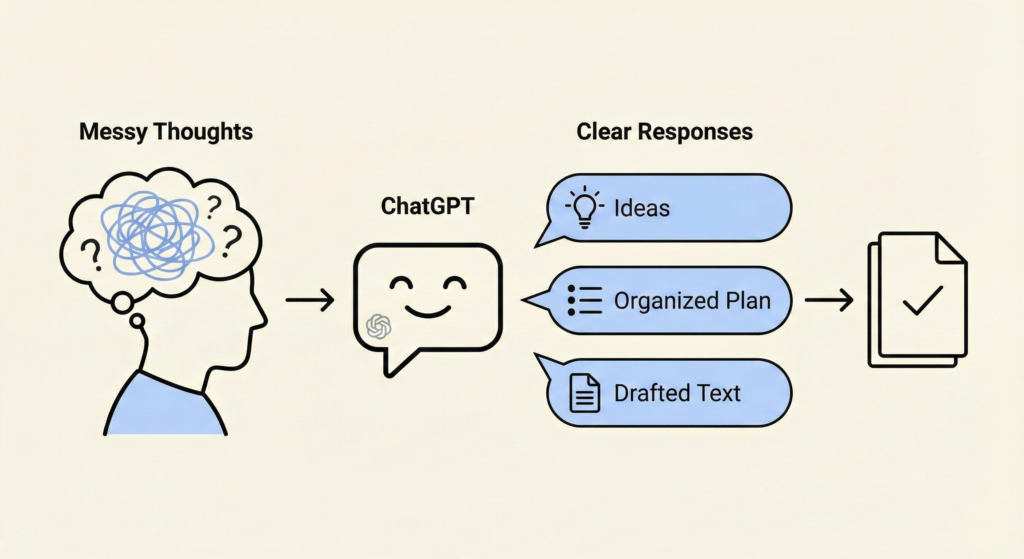
- Turning messy thoughts into usable words
When the tool behaves more predictably, people stop fighting it and start using it.
That's the real upgrade.
Real-Life Examples
Let me show you what this looks like in practice.
A Parent Planning a Week
The problem: Too many moving parts. School. Work. Meals. Appointments.
How ChatGPT 5.2 helps: You can describe your week in plain language and ask for a simple plan. It keeps details straight and doesn't drop key constraints.
The result: A clearer week with less mental clutter.
A Freelancer Cleaning Up Client Emails
The problem: Emails that sound rushed, unclear, or too blunt.
How ChatGPT 5.2 helps: It rewrites emails with clearer tone and intent, without overdoing it.
The result: Less second-guessing. Fewer awkward replies.
A Small Business Owner Brainstorming Offers
The problem: Ideas feel scattered. Everything sounds the same.
How ChatGPT 5.2 helps: You can talk through your business like you would to a person. It reflects ideas back in a more structured way.
The result: Clearer offers without starting from scratch.
A Job Seeker Preparing for Interviews
The problem: Knowing what to say without sounding rehearsed.
How ChatGPT 5.2 helps: It helps organize answers and refine stories while keeping them natural.
The result: More confidence going into interviews.
A Podcaster Outlining an Episode
The problem: Too many ideas. No clear flow.
How ChatGPT 5.2 helps: It helps shape a loose idea into a clean outline and keeps the thread intact.
The result: Less prep time. Better structure.
Someone Organizing Their Thoughts
The problem: Feeling stuck or overwhelmed.
How ChatGPT 5.2 helps: You can dump thoughts without filtering. The tool organizes them without changing your meaning.
The result: Clearer thinking and calmer decisions.
Common Everyday Uses
People use ChatGPT for all kinds of things beyond work. Here are some common ways everyday people use ChatGPT 5.2:
Quick Advice and Decision-Making
Ask for personalized recommendations. Meal ideas. Fitness routines. Travel plans. Skincare tips.
Example:“Suggest a weekly meal plan for a family of four on a budget, with vegetarian options.”
ChatGPT 5.2's reduced hallucinations make advice more trustworthy.
Writing and Communication Help
Draft emails, texts, social media posts, or personal letters. Rephrase messages politely or creatively.
Example:“Help me write a polite email declining a job offer.”
Learning and Explanations
Break down complex topics simply.
Example:“Explain quantum physics like I'm ten.”
Or:“How does inflation work in everyday terms?”
Improved reasoning helps with step-by-step tutorials on hobbies like gardening or cooking.
Planning and Organization
Create schedules, to-do lists, budgets, or event plans.
Example:“Plan a weekend getaway to a national park, including itinerary and packing list.”
It handles multi-step planning better than previous versions.
Creative Fun and Entertainment
Brainstorm ideas for stories, jokes, poems, or role-playing games. Generate recipes, workout plans, or dream interpretations.
Many users enjoy casual chats or exploring “what if” scenarios.
Problem-Solving in Daily Life
Troubleshoot home issues. Translate languages. Summarize articles. Get gift ideas.
Example:“Why is my plant dying?”
With vision capabilities, you can upload images for analysis. But consult professionals for health-related questions.
What ChatGPT 5.2 Still Doesn't Do
It doesn't think for you. It doesn't understand context the way a human does. It can still be confidently wrong.
You still need to:
- Check important facts
- Apply judgment
- Decide what actually matters
People get into trouble when they treat AI like an authority instead of a helper.
ChatGPT 5.2 is not a replacement for expertise. It's a tool that makes certain tasks easier.
How to Access ChatGPT 5.2
ChatGPT 5.2 is rolling out gradually. Here's the current situation:
- Paid subscribers: (Plus, Pro, Team, Enterprise) got access first. You can select specific variants for different tasks.
- Free users: Access is expanding gradually. Not everyone has it yet, but it's rolling out.
- Developers: Available immediately via OpenAI's API.
You can try it at chatgpt.com or through the ChatGPT app.
Start simple and see how it fits your day.
How to Use ChatGPT 5.2 Simply
Here are habits that work:
- Be specific about what you want
- Add context instead of asking vague questions
- Treat it like a thinking partner, not a replacement
- Stop when the answer is good enough
The goal is not perfect output. The goal is less friction.
Who Benefits Most?
ChatGPT 5.2 is marketed heavily for professional and enterprise use. OpenAI's marketing materials claim it can save heavy users 40 to 60 minutes daily, though that's based on their internal estimates, not independent studies.
But it's accessible to everyone through ChatGPT. And it brings meaningful upgrades for personal tasks.
You don't need to be a power user to benefit. You just need to be someone who:
- Writes emails
- Plans your week
- Looks for advice
- Wants to think through problems
- Needs help organizing thoughts
If that sounds like you, ChatGPT 5.2 is worth trying.
Final Takeaway
ChatGPT 5.2 is not about wow moments. It's about fewer interruptions to your thinking.
If you're an ordinary person who wants help writing, planning, organizing, or thinking things through, this version is easier to live with than the ones before it.
It's steadier. More predictable. More reliable.
That alone makes it worth paying attention to.